You call 60 games a season.
How much feedback do you actually get?
Evaluate Me! turns the conversation you never get to have into something you can actually use — structured peer evaluations, notes you capture during the game, and a clear picture of whether you're getting better.
Officiating is the only craft where nobody tells you how you did
You shake hands, walk to the parking lot, and drive home. The only unsolicited feedback all night came from a coach who disagreed with a block/charge.
The tape runs out
By Tuesday you can't remember the play you wanted to ask your partner about. The detail that would have made you better is gone.
Advancement is a black box
Varsity slots, playoff assignments, and college looks go to officials somebody noticed. Without a record, "he's solid" is the whole scouting report.
Camp is once a year
You pay for a weekend of real evaluation, take home a page of notes, and then go eleven months without another honest read.
Feedback that survives the drive home
Everything here exists because officials asked for it — not because it demoed well.
Notes during the game
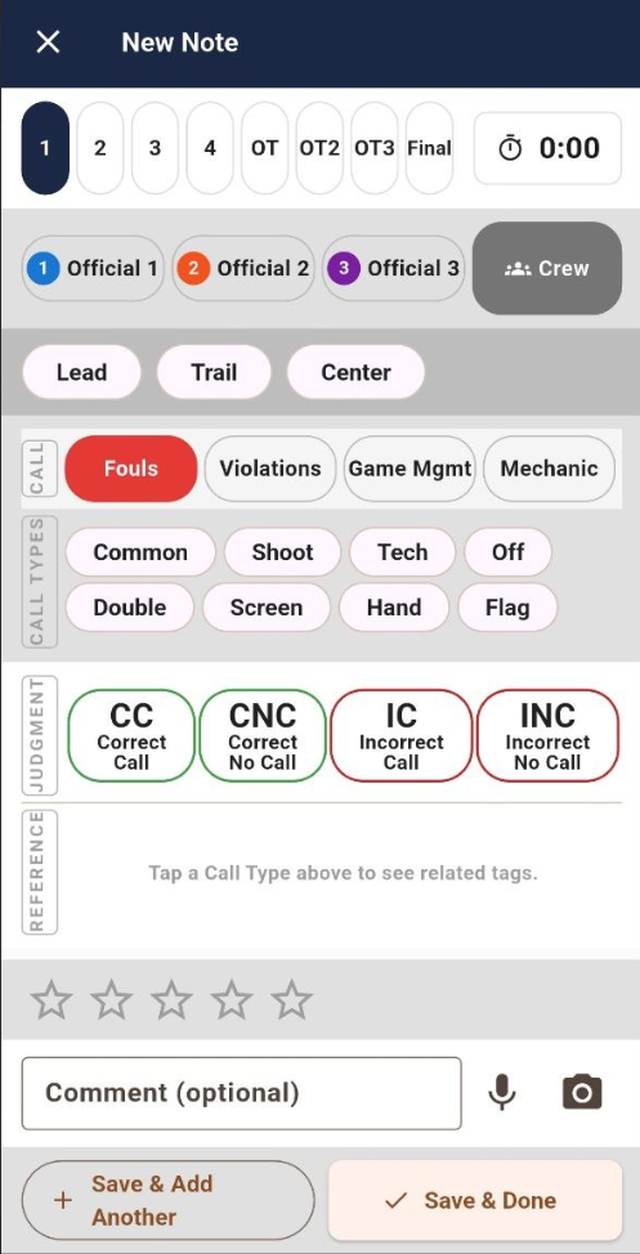
Period, game clock, position, call type — logged in a few taps. Fouls, violations, game management, mechanics. Built for one thumb between dead balls.
Works with no signal
Everything saves to your phone first and syncs when you're back on a real connection. The auxiliary gym has never had bars and never will.
See yourself improve
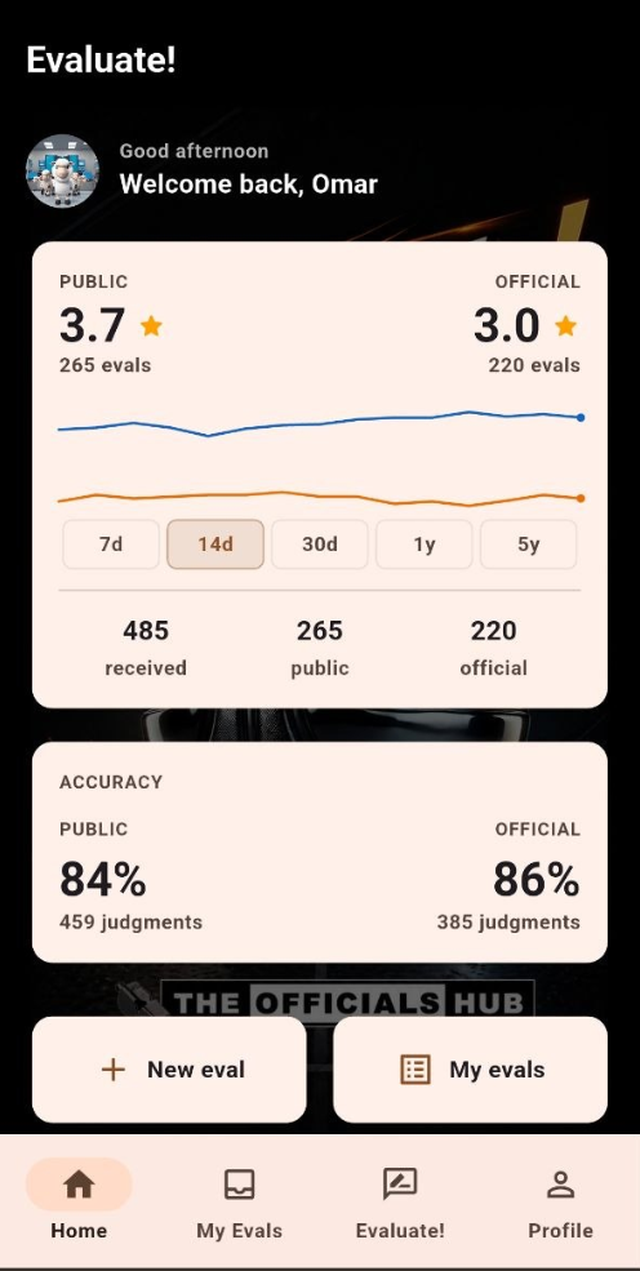
Strengths radar and trend lines across seven days to five years. "Get better" stops being a feeling and starts being a shape you can point at.
The language you already use
CC, CNC, IC, INC. Lead, Trail, Center. The app speaks in officials' terms, so two evaluators are grading the same things the same way.
Made for a crew
Two-person and three-person mechanics, with a QR code that adds your partners in seconds instead of spelling names in a parking lot.
An accuracy number
Every judgment logged against you rolls up into a percentage — public and official tracked separately — so "how am I doing?" finally has an answer.
Who sees what
Being rated by your peers is a fair thing to be nervous about. So here is exactly how it works, before you sign up.
Two separate tiers
Public ratings and official ratings are tracked apart. A rating from a certified evaluator is never blended with a casual peer rating.
Visibility is yours
Evaluations follow the app's visibility settings. You decide what's shared, and you can see every evaluation you've received.
Leave whenever you want
Delete your account from your profile. Your details are removed after a 30-day grace period, and remaining evaluation records are de-identified.
Full detail in the Privacy Policy and Terms of Service.
Three ways in. All of them free.
Evaluate Me! is free for officials. No trial, no card.
Use it in your browser
The full app, in any modern browser. On a phone you can add it to your home screen and it behaves like an installed app — including working offline.
Open the web appGoogle Play
The native Android build, with everything the web version has plus full camera and scanner support.
Get it on Google PlayAdd it to your home screen
The App Store version is on its way — but you don't have to wait. Open the app in Safari, tap Share, then Add to Home Screen and you get the full thing, full screen, working offline.
Open in SafariThe Scouting Report
Who it's for
- Assigners deciding who's ready for varsity or playoff assignments
- Camp directors tracking officials across a weekend and season over season
- Association leadership and interpreters building development plans
- Conference and state supervisors who need evidence, not impressions
What it opens up
- Public and official ratings side by side, with history — not a single snapshot
- Call accuracy percentages built from CC/CNC/IC/INC judgments
- Strengths and weaknesses broken out by rubric dimension
- Evaluation volume, so you know how much a rating is actually worth
- Trends that show whether an official is developing or plateauing
The Scouting Report is a separate paid product for organizations. Tell us about your association or camp and we'll get you set up.
See it work
Taking notes during a game
Submitting an evaluation
Frequently asked
Is it really free?
Yes — Evaluate Me! is free for officials, with no trial period and no card required. The paid product is the Scouting Report, which associations and camps buy.
Who can see the evaluations I receive?
Evaluations follow the visibility settings in the app, and public ratings are kept separate from official ratings. You can always see every evaluation submitted about you.
Do I have to install anything?
No. The web version at app.evaluateme.app is the complete app. On a phone you can add it to your home screen and it runs full-screen and offline, just like an installed app.
Does it work when the gym has no signal?
Yes. Notes and drafts are written to your device first and sync to your account when you're back on a connection. You can work an entire game in airplane mode.
Is there an iPhone app?
It's coming. In the meantime the web version runs on iPhone today — open the app in Safari, tap Share, then Add to Home Screen, and it behaves like an installed app.
Can my assigner see my ratings?
Only through the Scouting Report, which is a separate product for organizations, and only in line with the visibility rules that govern your evaluations.
What's the difference between a public and an official rating?
Official ratings come from certified evaluators. Public ratings come from peers. They are tracked and displayed separately so one never dilutes the other.
How do I delete my account and my data?
Profile → Delete account. Your account locks immediately, the request is reversible for 30 days, and after that your personal details are permanently removed and any remaining evaluation records are de-identified.